Three thousand frames.
Ninety minutes nobody wants to spend.
7Photo is a photograph library that lives on your own Mac, knows which of five near-identical frames has the sharp eyes, and is meant to be reachable from your phone — without any of it leaving the machine.
The library is an index, not a container
Your files stay where you put them — card, SSD, NAS. Nothing is moved or copied. The only writes near your originals are XMP sidecars beside them.
It has an opinion, and shows its work
Sharpness measured on the eyes rather than the whole frame. Blink detection.
Per-person priority. You see 0.261 against 0.027
and decide whether to believe it.
Reachable, without sync
One authoritative copy on your Mac, reached directly. No merge, no conflicts, no cloud, no subscription, and nobody else holding your clients' photographs.
Choosing between two frames of the same moment
This is what a cull actually is. Not browsing — choosing, five times a second, between frames that differ only in whether somebody blinked and whether the focus landed. Every other tool makes you answer that by looking at one frame and then the next, by which time you no longer remember the first precisely enough.
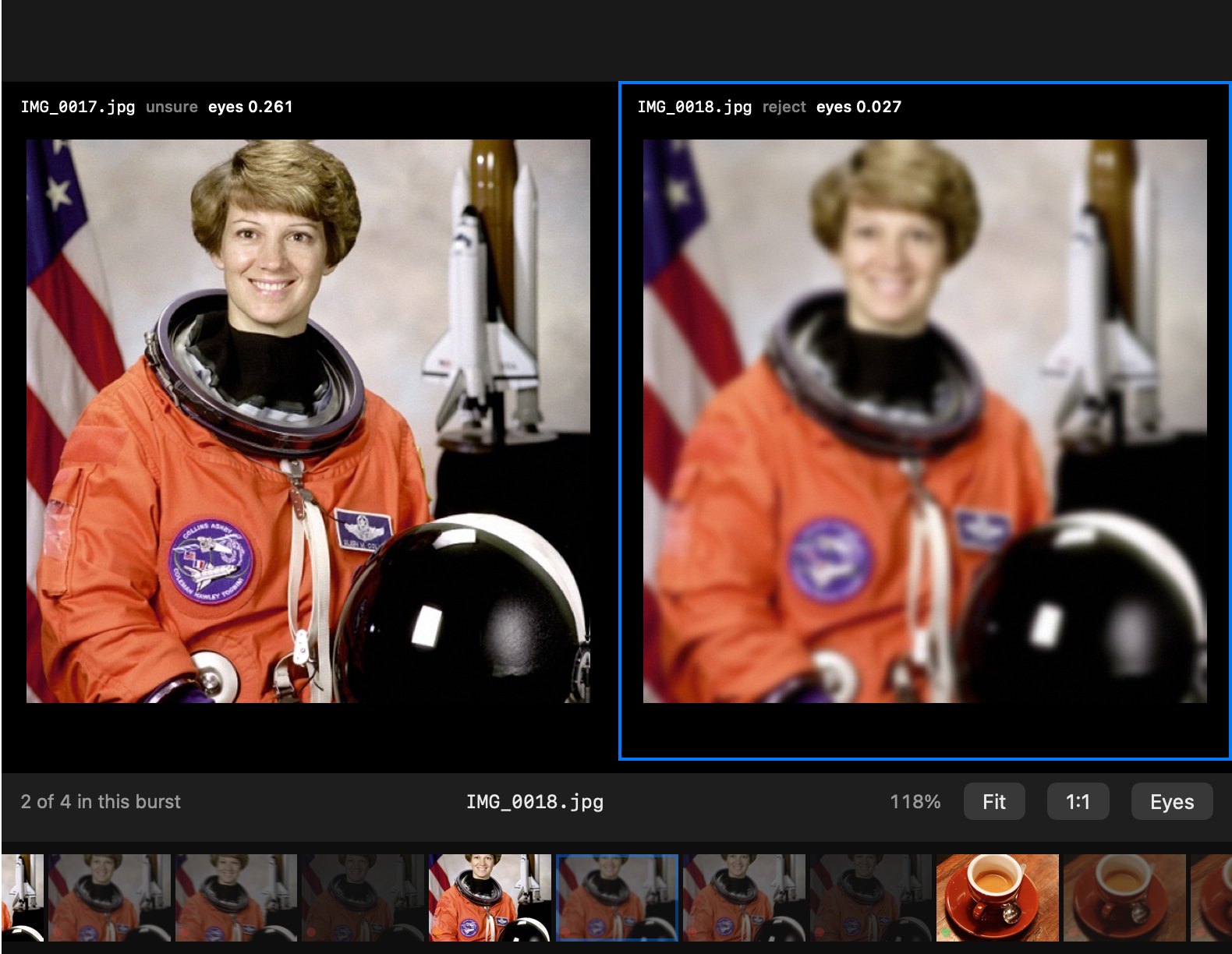
C for the burst, Z for the eyes.
Why the eyes and not the frame
A portrait with a crisp jumper and soft eyes is a reject, and no whole-frame sharpness number can tell you that. 7Photo measures on the detected eye region, falling back to the face and then the frame when it has to — and it says which one it used.
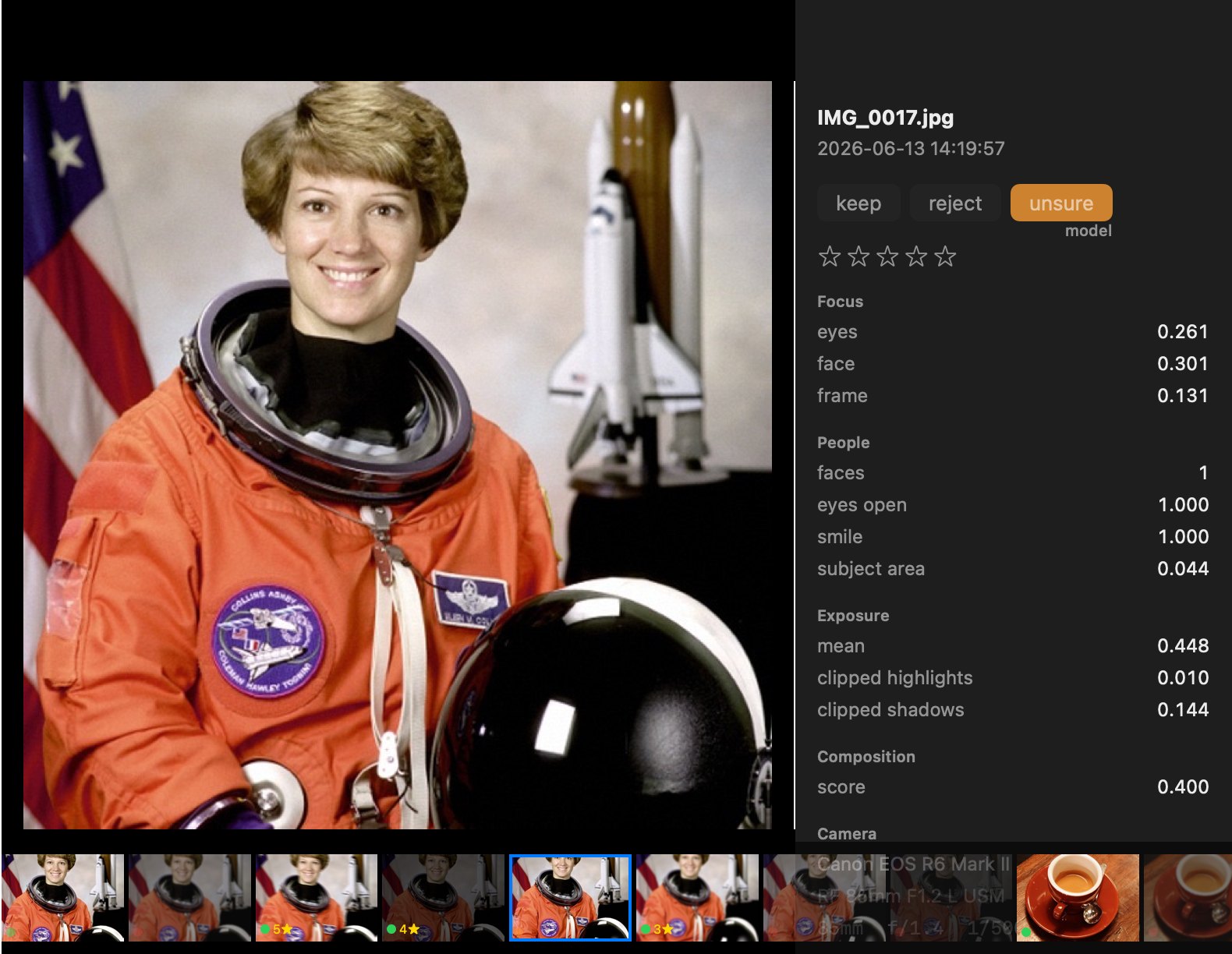
Why your judgement and the model's are kept apart
Two separate rows in the table, keyed on (uid, source). A model
verdict can never overwrite yours, and the interface draws the model's faintly so
you can always tell what is left to answer. An earlier version keyed on
uid alone and one automated pass silently destroyed sixty answered
frames; the rule exists because of that.
It learns you, and it cannot learn wrong
The preference model trains on your decisions only, and on within-burst comparisons rather than absolute scores — because "is this a good photograph" is a question nobody agrees on, while "is this one better than that one, of the same moment" is a question you answer the same way every time.
Every learned model is cross-validated against the plain rule-based scorer and discarded if it loses. It can get better at predicting you. It cannot get worse than the rules it replaced. That discipline is available to a single-photographer tool and not to anything that has to ship one model to everybody.
The aesthetic model is a worked example of the same restraint. A standard image-quality network was trained in, measured, and then deliberately kept out of the scorer, because on real shoots it rewarded blown highlights — correlation +0.50 with clipping. It is offered to the preference model, which can learn to ignore it, and never used as a rule.
Your Mac is the server
Every library product that works on your phone made the same bet: take custody of the files so they can be synced. Apple Photos copies them into an opaque bundle. Lightroom CC uploads them. Both are unworkable for a photographer whose archive is measured in terabytes, and both are unacceptable for anyone who signs an NDA.
7Photo does the opposite. One authoritative copy stays on the Mac and the phone connects to it. That removes the hardest problem in any library product rather than solving it — and it is only possible because of what the index actually weighs.
Measured, not estimated
Every number on this page comes from running the thing on a real 435-frame shoot from a Nikon D610. Where a figure is extrapolated to a hundred thousand photographs, it says so.
What a phone would actually have to carry
| Tier | Per photograph | At 100,000 | Where it goes |
|---|---|---|---|
| Index, without vectors | ~4 KB | 400 MB | anywhere, instantly |
| Columns a phone grid needs | ~0.2 KB | 20 MB | nothing at all |
| Grid thumbnails, 512px | 36 KB | 3.6 GB | fits on a phone |
| Previews, 1400px | 198 KB | 19.8 GB | streamed on demand |
| Search and face vectors | 5.4 KB | 540 MB | stays on the Mac |
| Originals | 25–30 MB | ~3 TB | never move |
A phone can browse, judge, rate and search a hundred-thousand-frame library over a connection that only ever carries kilobytes, and pull a 200 KB preview when you open one. Neither Photos nor Lightroom can do that, because both assume the original is present.
Getting a photograph on screen
Those four numbers decided the architecture: never decode an original to draw a grid. The camera's thumbnail appears at once while a proper one is made in the background, and two sizes come out of one decode because the second is free.
Nothing is trapped
| What | Where it goes |
|---|---|
| Your verdicts and star ratings | XMP sidecars beside the originals — colour label for the flag, XMP:Rating for the stars, exactly as Lightroom reads them. A RAW and the JPEG the camera wrote beside it are one photograph, judged once, so one verdict reaches the sidecar Lightroom reads for the RAW |
| Everything measured | One SQLite file in .7photo/, with the format documented in the source |
| Your originals | Exactly where you left them. Untouched. |
A shoot culled here opens in Lightroom or Capture One with the flags and stars already on it. 7Photo does not need to win your whole workflow — it takes the ninety minutes nobody wants and hands the rest back.
And the cache is a published contract rather than a proprietary catalogue. Two languages already read and write it under one documented rule. A third could. Delete it and nothing irreplaceable is lost: every measurement can be recomputed, and the one table that cannot — your decisions — is the one the design protects.
The library
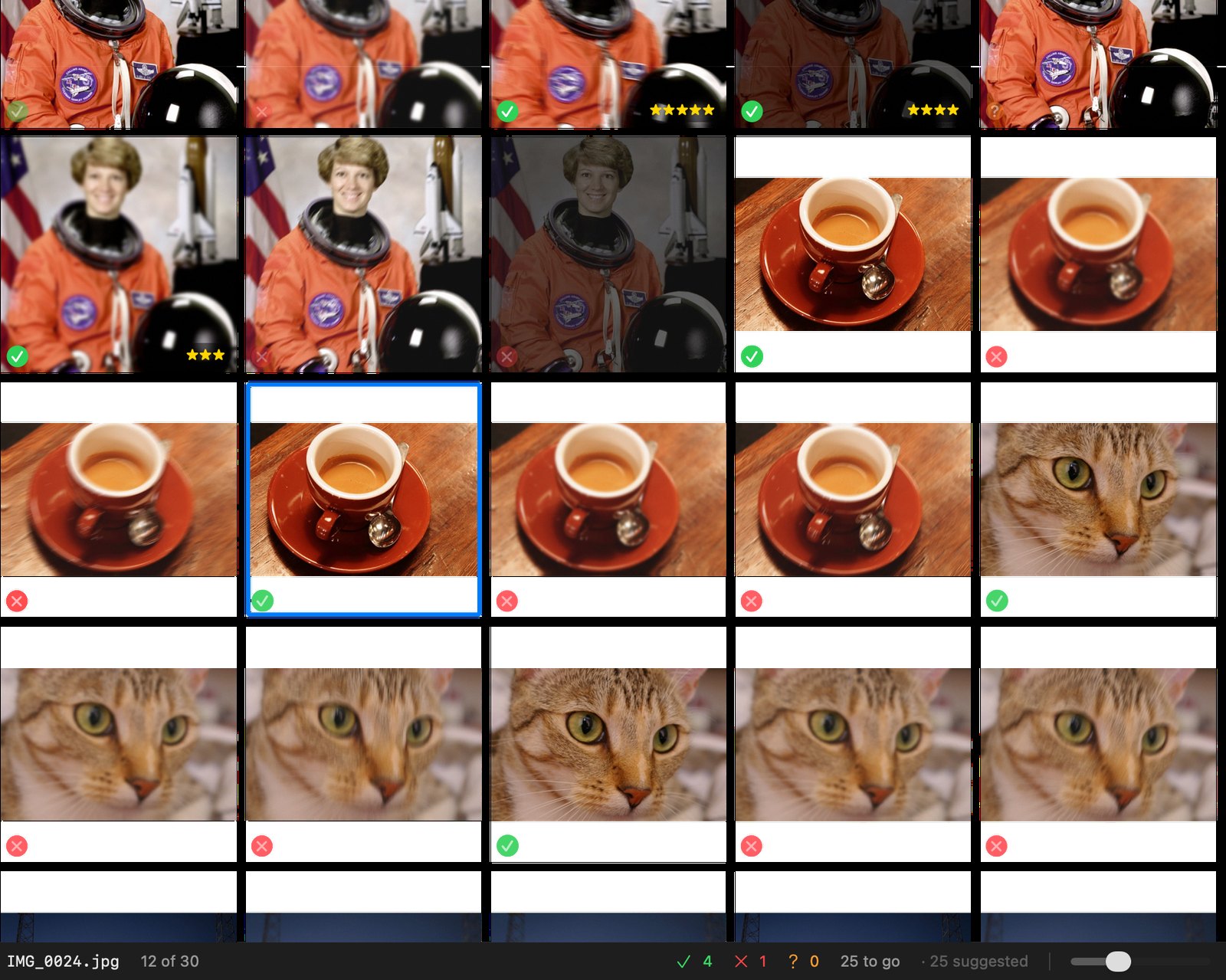
G grid, E one
frame, C compare, Z zoom to the eyes, K X U
to judge, 0–5 for stars, ⌘Z to take it
back.
About these screenshots
They are of a mock shoot the project builds for itself —
tools/make_sample_shoot.py — because a sample folder of stock
photographs is not a shoot. What it fabricates is the structure: scenes
shot in sequence, bursts within them, one good frame per burst and the rest
spoiled the way frames actually get spoiled, plus the duplicate from a card
copied twice and the EXIF that advances plausibly. The photographs inside it are
real — scikit-image's sample set, and NASA's portrait of Eileen Collins, which
is public domain. Nobody's client is on this page.
How it compares
7Photo is not a replacement for Lightroom or for Photos. It is the step before them — deciding which frames are worth keeping — and it is built to hand its decisions to both rather than to take their place. What follows is what each tool is built around, as we understand them in October 2026; they change quickly, and corrections are welcome.
| 7Photo | Lightroom Classic | Lightroom (cloud) | Apple Photos | AfterShoot | Narrative Select | Photo Mechanic | |
|---|---|---|---|---|---|---|---|
| What it is for | culling, and a library across shoots | catalogue and raw development | editing and sync, in the cloud | a personal library on every Apple device | AI culling and editing, for Lightroom | AI-assisted culling | fast ingest, browsing and captions |
| Your files stay where you put them | yes | yes | no — kept in Adobe's cloud | kept in its library, by default | yes | yes | yes |
| Finds the best frame of a burst — focus on the eyes, blinks | yes, and shows its numbers | by hand | by hand | groups bursts; you choose | yes | yes | by hand, very fast |
| Learns your own taste from your verdicts | yes, and drops what does not beat the rules | no | no | no | personal profiles, mainly for editing | no | no |
| Knows the same people across shoots | yes, and judges group shots by the people who matter | yes | yes | yes | no | no | no |
| Works on your Apple Photos library without importing it | yes — read where it is | imports copies | imports copies | it is the library | no | no | no |
| Raw development and editing | quick corrections; no raw development | the reference | yes | basic | AI edits, applied in Lightroom | no | no |
| Face retouching — slim, skin, blemishes | yes, non-destructive | healing, no reshaping | healing, no reshaping | a retouch brush | as an add-on | no | no |
| Hands its decisions on | XMP sidecars Lightroom reads | — | — | — | to Lightroom | to Lightroom | to any XMP reader |
| How you pay | nothing — not yet a product | subscription | subscription | free; storage paid | subscription | free tier and subscription | licence or subscription |
| Runs on | Mac; a phone through its browser | Mac, Windows | everywhere, and the web | Apple devices | Mac, Windows | Mac, Windows | Mac, Windows |
Where each of them is the better choice
Lightroom for anything that ends in an edit: its raw development is decades of measured camera and lens profiles, and nothing here tries to match it. Apple Photos for a family library on an iPhone, an iPad and a Mac at once — it syncs, and 7Photo deliberately does not. AfterShoot and Narrative Select for photographers who want culling and AI editing from a company with support behind it; they are mature, and this is one person's work. Photo Mechanic for press work against a deadline: its ingest and captioning are the fastest there are.
Where 7Photo is
When the cull itself is the hard part, and it matters why a frame was chosen: it shows the sharpness at the eyes, the blink, the smile and the burst it was compared in, and it learns one photographer's taste without ever being allowed to do worse than plain rules. When the photographs must not leave the machine — nothing is uploaded, ever. When the shoots live on many drives, or in Photos, and moving them is not an option: it reads them where they are. And when a decade of judgements should outlive the tool: they are in a documented SQLite file, and in sidecars Lightroom reads.
How they work together
Cull in 7Photo, then File → Export to Lightroom: the shoot opens in Lightroom with its flags and stars, and the editing starts there. Or open an album straight from Photos and cull it in place, with nothing imported anywhere.
What it isn't
A tool that tells you what it cannot do is more useful than one that guesses. The same goes for its own description.
There is no raw development, and there never will be
Lightroom's raw processing is not an algorithm you can read and implement. It is dual-illuminant colour profiles measured for around a thousand camera bodies, two thousand measured lens profiles, a proprietary demosaic, highlight reconstruction that keeps skin from going magenta, and a jointly designed locally adaptive tone operator revised five times in twenty years. Three years of work would produce something that looks worse on a D610 than Adobe looks on its first day.
Culling does not need it. The camera's own embedded preview shows focus and expression, rendered by the people who made the sensor. The one real cost is that a JPEG preview clips earlier than the raw, so the clipped-highlight measure reads high — which is written down rather than papered over.
What it does have are the quick corrections a culler wants before an export, on the rendered photograph rather than the raw: rotate, exposure, contrast, highlights, shadows, whites and blacks, temperature, tint, vibrance and saturation — Lightroom's Basic panel by name, kept with the photograph and made into a JPEG only on export. Anything that deserves real development goes to Lightroom, with its flags and stars.
Not on an aeroplane
The Mac has to be awake and reachable. That is the direct, unbendable cost of refusing to sync, and it buys the only sentence worth saying: your photographs never leave your machine.
It says when it does not know
Orientation detection abstains rather than guess, because rotating an upright frame is corruption while leaving a sideways one is merely a nuisance. Frames it is unsure of are marked unsure rather than quietly assigned. A professional tool that says "I am not certain about these" is worth more than one that silently decides. And even a confident reading is only applied when you ask for it — Settings → Turn photographs upright by their faces, off by default — so out of the box every photograph is shown as the camera stored it.
Where it is in progress
The culling engine
The Python engine and command line, 7photo. Thirteen commands. Face and person recognition, burst and scene grouping, duplicate detection, geometric composition analysis, preference learning, semantic search, XMP export, retouching. 539 tests. It stays as the laboratory: every Swift port is tested against it.
The native Mac app
Grid, filmstrip, compare mode, true 1:1 on the detected eyes, undo, stars, filtering, a sidebar of Moments named by when they began. Scanning, naming people and exporting to Lightroom, all from the app. About 15,500 lines of Swift, 401 tests, no third-party packages.
One library across many shoots
A timeline across every shoot, albums that draw from any of them, people recognised across folders with their names carried along, search by words and keywords, and a catalogue that knows a shoot is on the drive that is not plugged in.
No Python in the app
Measuring, judging, grouping people and learning your taste, all in Swift on Core ML and Vision. On a 435-frame wedding: the whole scan in under a minute, its models on the Neural Engine, 435 of 435 verdicts and 516 of 516 faces as the engine gave them. A scan can be stopped, and the next one resumes from what was measured.
Retouching in the app
Slim faces, and reshape them part by part — eyes, brows, nose, mouth, the face's outline, twenty-two sliders as Face-Aware Liquify has them — on every face or the ones chosen; smooth skin, remove blemishes; straighten to a tenth of a degree, correct perspective, crop freely or to a ratio, as Photos and Lightroom do; light and colour by Lightroom's names, with a histogram. A live preview, and no seams: the warp cannot fold, and the skin mask covers the forehead and stops at hair. Non-destructive — the settings are kept with the photograph and made into full-size JPEGs in a Retouched/ folder only on export, a close-up in a few seconds — and the engine's own output to the byte on its test fixtures, to within a level on a full-size close-up.
Reaching it from a phone
The cheapest test of the whole design. The engine's browser workbench, 7photo review, has been used from a phone on the home network; over Tailscale, away from the house, is still to be tested, and the app's own phone server waits on that.
This is not a product yet. It runs, it is tested, and it has been used on real shoots. The app builds into a single bundle that carries its models and runs without Python or this repository — but building it still needs a developer toolchain, the bundle is not signed or notarised, there is no installer, and the face-identity model it uses is released for non-commercial use. Those are known and sequenced, not discovered.